Overview
Order Hub allows printing of receipts/tickets to a STAR printer or Partner Thermal receipt printer.
Downloads
Upgrading From Fulfilment Console
If you are upgrading from the original fulfillment console, 'QZ Tray' print controller must be disabled on the terminal.
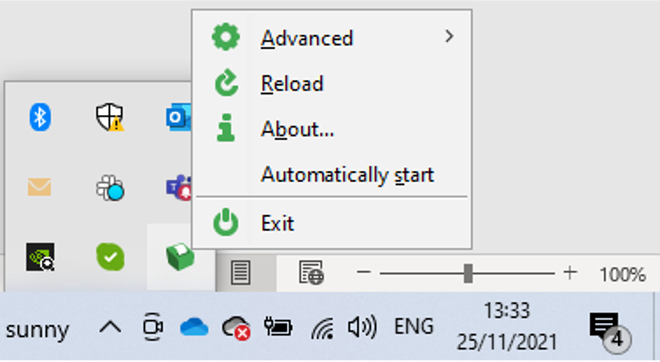
- Remove or set “Automatically Start” marker on QZ Tray icon to blank.
- The QZ tray icon can be found on the icons available at the bottom left of your pc.
Printer Setup
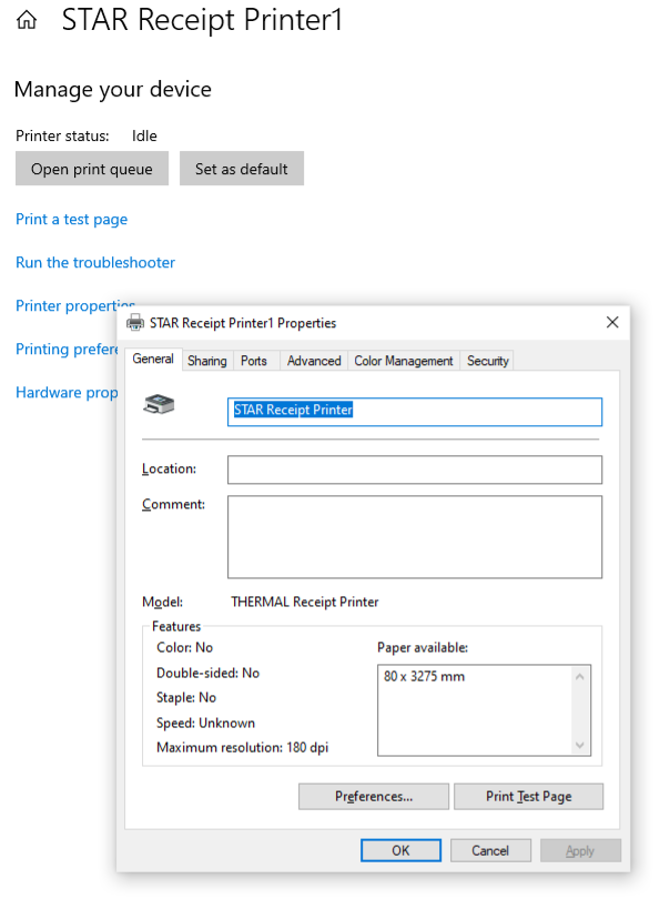
- Ensure the name of the Printer on PC reads “STAR Receipt Printer“ (this is for both STAR and PARTNER thermal printers - a future update will remove the need for this)
- Go Printers and Scanners > Select Manage > Printer Properties and update name of printer.
- You are good to print from Order Hub
Printing from Order Hub
As orders are placed, Order Hub will automatically print these orders for the logged in user. To make sure printer is connected and live orders are coming through please check the folllowing: